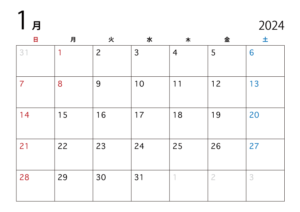
PHPの勉強をはじめました。なかなか難しいですが、まだ挫折はしていないぞ。まずはシンプルなカレンダーを作成してみます。
この本で勉強

まずは本を買って勉強。
カラーで見やすいけど、実践例が少ないかな。
別の本をもう1冊買おうか?とも思いましたが、とりあえず簡単なものを作ってみます。
シンプルカレンダー
シンプルカレンダーがよさそうです。
基本的な文法も使うし、HTML、CSS、PHPを一通り使いながら作成できます。
Bootstrapなんて聞いたことない(本にも載ってない)のも使うようですが、できるかな?
コード
いろんなサイトをみて作ってみました。
- <?php
- //タイムゾーン設定
- date_default_timezone_set('Asia/Tokyo');
- //前月・次月選択されたGET年月を取得
- if(isset($_GET['ym'])){
- $ym = $_GET['ym'];
- }else{
- //今月の年月
- $ym = date('Y-m');
- }
- //strtotime('Y-m-01')
- $timestamp = strtotime($ym . '-01');
- if($timestamp === false){//形式チェックを追加
- //falseが返ってきた時は、現在の年月を取得
- $ym = date('Y-m');
- $timestamp = strtotime($ym . '-01');
- }
- //今月の日付 例)2020-10-2
- $today = date('Y-m-j');
- //カレンダーのタイトル作成 例)2020年10月
- $html_title = date('Y年n月', $timestamp);//date
- //前月・次月の年月を取得
- //strtotime(,基準)
- $prev = date('Y-m', strtotime('-1 month', $timestamp));
- $next = date('Y-m', strtotime('+1 month', $timestamp));
- //該当月の日数取得
- $day_count = date('t', $timestamp);
- //1日が何曜日か
- $youbi = date('w', $timestamp);
- //カレンダー作成準備
- $mouths = [];
- $week = '';
- //第1週目:空のセルを追加
- //str_repeat(文字列, 反復回数)
- $week .= str_repeat('<td></td>', $youbi);
- for($day = 1; $day <= $day_count; $day++, $youbi++){
-
- $date = $ym . '-' . $day;
-
- if($today == $date){
-
- $week .= '<td class="today">' . $day;//今日の場合はclassにtoday
- } else {
- $week .= '<td>' . $day;
- }
- $week .= '</td>';
-
- if($youbi % 7 == 6 || $day == $day_count){//週終わり、月終わりの場合
- //%は余りを求める、||はまたは
- //土曜日を取得
-
- if($day == $day_count){//月の最終日、空セルを追加
- $week .= str_repeat('<td></td>', 6 - ($youbi % 7));
- }
-
- $mouths[] = '<tr>' . $week . '</tr>'; //mouths配列にtrと$weekを追加
-
- $week = '';//weekをリセット
- }
- }
-
- ?>
- <!DOCTYPE html>
- <html lang="ja">
- <head>
- <meta charset="utf-8">
- <title>PHPカレンダー</title>
- <link rel="stylesheet" href="https://stackpath.bootstrapcdn.com/bootstrap/4.2.1/css/bootstrap.min.css" integrity="sha384-GJzZqFGwb1QTTN6wy59ffF1BuGJpLSa9DkKMp0DgiMDm4iYMj70gZWKYbI706tWS" crossorigin="anonymous">
- <link href="https://fonts.googleapis.com/css?family=Noto+Sans" rel="stylesheet">
- <style>
- .container {
- font-family: 'Noto Sans', sans-serif; /*--GoogleFontsを使用--*/
- margin-top: 80px;
- }
- h3 {
- margin-bottom: 30px;
- }
- th {
- height: 30px;
- text-align: center;
- }
- td {
- height: 100px;
- }
- .today {
- background-color: #B7E8DF;/*日付が今日の場合は背景薄緑*/
- }
- th:nth-of-type(1), td:nth-of-type(1) {/*日曜日は赤*/
- color: red;
- }
- th:nth-of-type(7), td:nth-of-type(7) {/*土曜日は青*/
- color: blue;
- }
- h3 {
- margin-top:30px;
- }
- </style>
- </head>
- <body>
- <div class="container">
- <h3><a href="?ym=<?php echo $prev; ?>"><</a><?php echo $html_title; ?><a href="?ym=<?php echo $next; ?>">></a></h3>
- <table class="table table-bordered">
- <tr>
- <th>日</th>
- <th>月</th>
- <th>火</th>
- <th>水</th>
- <th>木</th>
- <th>金</th>
- <th>土</th>
- </tr>
- <?php
- foreach ($mouths as $week) {
- echo $week;
- }
- ?>
- </table>
- </div>
- </body>
- </html>
こんな感じでHTML CSS PHPを1枚で書いています。
最初はこのほうがわかりやすいかも。
これを実行すると・・・
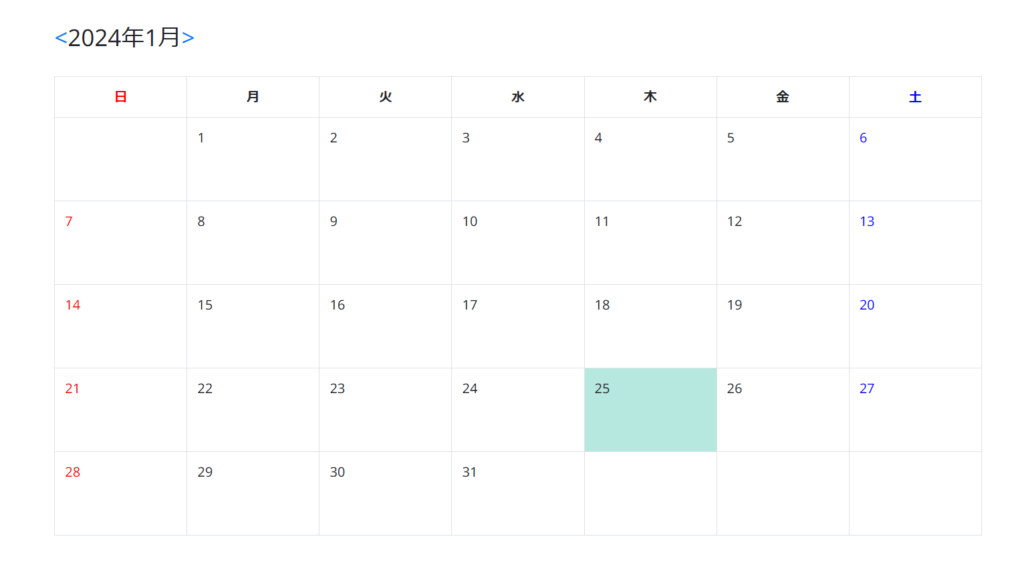
で、で、できましたー!
今日の日付のところはちゃんと色がついています。
「<」で先月が表示されますよ。
いろんなサイトをみて、ほぼコピぺしただけなので出来て当たり前ですが、うれしい。
コードの理解
コードを理解しなきゃ勉強にならないので、コードを読み解きます。
45行目からが嫌~な感じです。
45行目:1日の曜日の前部分を空白で埋めます。
47行目から:ループしながら、今日の日付を探してclass=”today”
59行目から:土曜日(週終わり)または月末の判定をします。
63行目から:月末の場合は後部分を空白で埋めます。
82行目:Bootstrapを使用します。(カレンダーの枠)
83行目:Googleフォントを使用します。
84~111行目:スタイル設定
115行目:<2024年1月>の表示
127行目:foreachで$mouthsから$weekを取り出して表示
まとめ
理解するのに時間がかかりました。
まだまだ勉強の日々です。
このシンプルカレンダーから祝日設定、月曜はじまり、任意の休み設定、スケジュール入力などをやっていきたいと思います。